The information in this page is likely outdated and may no longer be relevant.
Learning to walk before you run
So you have choosen to take on the harsh wasteland that is coding UI and working with Stylesheets? Great! But before you can startQuick and dirty (Using FancyWindow)
The line between life or death is determined by what we are willing to do.
- Bear Grylls
FancyWindow instead of DefaultWindow!
To use it you just change:
Learning from those that survived
When taking your first steps into the UI wasteland you sould look at how the brave UI coders that came before you survived this harsh environment. One of the best examples to look at is the GravityGeneratorWindow. It containes some basic style classes that you can just use for your own UI like:StatusFieldTitle for labels and OpenRight\OpenLeft for buttons.
You can just copy the StyleClasses="..." attribute into your ui component to make use of them.
Whenever you see a fancy UI that has a component that is styled the way you need it and it’s written in xaml you can try and see if just copying that does the trick.
Digging deeper
The rewards of the wild and the rewards of the survivor go to those who can dig deep, and, ultimately, to the guy who can stay alive.
- Bear Grylls
FancyWindow and StyleNano mainly consists of tree things:
- Variable/Constant declarations
- Style classes written the hard to read way
- Style classes written the easy to read way
Hard to read way of declearing a style class
Currently most of the style classes are written using the hard to read way like so: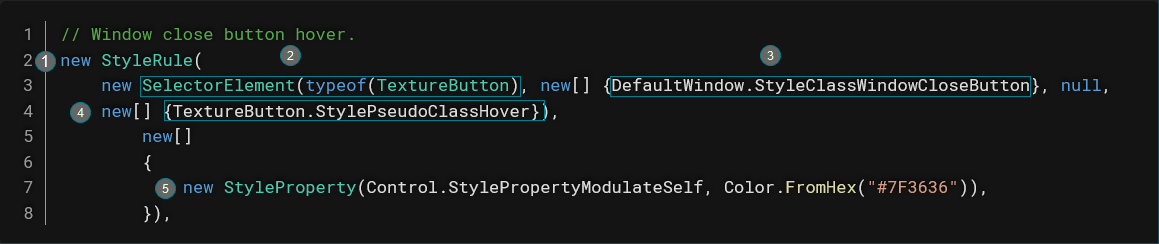
- New style classes are created by instanciating the StyleRule class
- You specify the type of control the class is for by instanciating a SelectorElement with the type of the control class
- Then you define style class names as an array of strings (StyleClassWindowCloseButton is just a string constant)
- The forth SelectorElement constructor parameter is a pseudo class you can use for things like hover states. This can be null.
- The second StyleRule constructor parameter is an array of Style properties. The StyleProperty constructor takes the property name as a string (Usually from a string constant inside the control you are trying to style) and a value you want to set that property to.
Easier to read way of declaring a style class
Element<PanelContainer>and.Class("BackgroundDark")specify the type of control and the class you want the style apply to..Prop(PanelContainer.StylePropertyPanel, new StyleBoxFlat(Color.FromHex("#25252A"))assigns a value the a property where the first argument is the property and the second argument is the value. In this case it sets the background color for a panel container.
The hidden dangers
But the wild is unpredictable, stuff does happen, and it’s always when you’re least expecting it.
- Bear Grylls