Keep in mind that some older areas of the codebase might not follow these conventions. These should be refactored in the future to follow them. All new code should try to follow these conventions as closely as possible.
General Programming Conventions
These conventions are not really specific to Space Station 14, and you should be following these no matter what project you are working on. Any experienced programmer should know these by heart.Don’t copy paste code
If you’re every looking at another piece of code and think “I want to do the same thing as this”: DO NOT copy paste it. Make a new function or some other kind of abstraction that allows you to re-use as much code as possible. Copy-pasting code is a gigantic maintenance hazard as, in the future, if somebody needs to update the code you copied, they now have to do it in two places (and be aware that those two places even exist). Of course, there are places where you may think you’re “copy pasting” unavoidable code. For example, the basic structure for making anEntitySystem that does a thing always has a class definition, some dependencies, an override void Initialize(), and so on. This kind of “boilerplate” is fine to copy as there’s really no way to avoid it.
Don’t use magic strings/numbers
These are kind of a subset of “don’t copy paste code”. A “magic” value is any case in which you have a value in your code, say a string or a number, and it needs to be that specific value because it has to be the same as some other value somewhere else. The name of the game here is “make sure that if two values have to match, it’s practically impossible for them not to be.” Be that via compiler error, unit test failure, a guaranteed crash on startup, whatever. In the simplest case, such magic values should simply be stored in aconst or static readonly that gets referenced from multiple locations, so the C# compiler enforces they will always be the same. If you need to reference a prototype ID from C#, you should define the prototype ID in a static readonly ProtoId<T>, since our validation tooling ensures the IDs in those fields are always valid.
Comments
- Comment code at a high level to explain what the code is doing, and more importantly, why code is doing what it is doing.
-
When documenting classes, structs, methods, properties/fields, and class members, use XML docs. DataFields and Public methods should always be documented.
- Example:
Why Not What
Some folks blindly adhere to “comment the why, not the what” and think that “code should be self-documenting and comments a last resort”. Below we present a few examples that we hope will change your mind.Example 1
Example 2
Strings and Identifiers
Human-readable text should never be used as an identifier or vice versa. In one direction, that means no putting human-readable text (result of localization functions) in a dictionary key, comparing with==, etc… In the other direction, that means things like “never show Enum.ToString() to a user directly.”
This avoids spaghetti when these inevitably have to be decoupled for various reasons, and avoids inefficiency and bugs from comparing human-readable strings.
Example:
Invariant comparisons on human-readable strings
If you’re doing something like a filter/search dialog, useCurrentCulture comparisons over human-readable strings. Do not use invariant cultures.
Properties
In a property setter, the value of the property should always literally become thevalue given. None of this:
Properly order members in a type
When laying out the contents of a type, you should always put fields above all other instance members. When reading a piece of code, the best way to get familiar with it is to look at the data it operates on. If fields and other members are mixed randomly, it can be much harder to understand the code. For this rule, auto-properties (e.g.string FooBar { get; set; }) are considered the same as fields, since they have an internal field. Non-auto properties (e.g. string FooBar => _field.Trim();) do not, so should not be mixed.
Bad:
Project Conventions
These conventions are specific to Space Station 14. They may talk about code or systems that aren’t relevant to other projects, or those other projects may simply have a different opinion about code style.File Layout
- Start with using directives at the top of the file.
-
All classes should be explicitly namespaced. Use file-scoped namespaces, e.g. a single
namespace Content.Server.Atmos.EntitySystems;before any class definitions instead ofnamespace Content.Server.Atmos.EntitySystems { /* class here */ }. - Always put all fields and auto-properties before any methods in a class definition.
Methods
Line breaks of parameter/argument lists
If you’re defining a function and the parameter declarations are so long they don’t fit on a single line, break them apart so you have one parameter per line. Some leeway is granted for closely tied parameter pairs like X/Y coordinates and pointer/length in C APIs. Bad:Constants and CVars
If you have a specific value such as an integer you should generally make it either:- a constant (const) if it’s never meant to be changed
- a CVar if it’s meant to be configured
Prototypes
Prototype data-fields
Don’t cache prototypes, use prototypeManager to index them when they are needed. You can store them by their ID. When using data-fields that involve prototype ID strings, use ProtoId<T>. For example, a data-field for a list of prototype IDs should use something like:
Enums vs Prototypes
The usage of enums for in-game types is heavily discouraged. You should always use prototypes over enums. Example: In-game tool “kinds” or “types” should use prototypes instead of enums.Resources
Sounds
When specifying sound data fields, useSoundSpecifier.
You should avoid defining sound paths directly and instead use SoundCollectionSpecifier whenever possible.
C# code example (click to expand)
C# code example (click to expand)
YAML prototype example (click to expand)
YAML prototype example (click to expand)
Sprites and Textures
When specifying sprite or texture data fields, useSpriteSpecifier.
C# code example (click to expand)
C# code example (click to expand)
YAML prototype example (click to expand)
YAML prototype example (click to expand)
RSI meta.json (click to expand)
RSI meta.json (click to expand)
- The order of fields should be
version -> license -> copyright -> size -> states. - JSON should not be minified, and should follow normal JSON quality guidelines (egyptian brackets, etc). All new JSON files should be indented at 4 spaces. Existing files should be changed to 4 space indent if you are modifying them (fix as you go). You should never be using tab for indent.
EntityUid in Logs
When usingEntityUid in admin logs, use the IEntityManager.ToPrettyString(EntityUid) method.
Admin log with entities example (click to expand)
Admin log with entities example (click to expand)
Optional Entities
If you need to pass “optional” entities around, you should use a nullableEntityUid for this.
Never use EntityUid.Invalid to denote the absence of EntityUid, always use null and nullability so we have compile-time checks.
e.g. EntityUid? uid
Components
Component data access modifiers
All data in components should be public.Component property setters
You may not have setters with any logic whatsoever in properties. Instead, you should create a setter method in your entity system, and apply the[Friend(...)] attribute to the component so only that system can modify it.
Your component may use properties with setter logic for ViewVariables integration (until we have a better system for that).
Component access restrictions
The[Access(...)] attribute allows you to specify which types can read or modify data in your class, while prohibiting every other type from modifying it.
Components should specify their access restrictions whenever possible, usually only allowing the entity systems that wrap them to modify their data.
Shared Component inheritance
If a shared component is inherited by server and client-side counterparts, it should be marked as abstract.Entity Systems
Game logic
Game logic should always go in entity systems, not components. Components should only hold data.Proxy Methods
When possible, try using theEntitySystem proxy methods instead of using the EntityManager property.
Examples (click to expand)
Examples (click to expand)
Public API Method Signature
All public Entity System API Methods that deal with entities and game logic should always follow a very specific structure. All relevantEntity<T?> and EntityUid should come first.
The T? in Entity<T?> stands for the component type you need from the entity.
The question mark ? must be present at the end to mark the component type as nullable.
Next, any arguments you want should come afterwards.
The first thing you should do in your method’s body should then be calling Resolve for the entity UID and components.
Example (click to expand)
Example (click to expand)
Resolve helper performs a few useful checks for you. In DEBUG, it checks whether the component reference passed (if not null) is actually owned by the entity specified.
This helper will also log an error by default if the entity is missing any of the components that you attempted to resolve.
This error logging can be disabled by passing false to the helper’s logMissing argument. You may want to disable the error logging for resolving optional components, TryX pattern methods, etc.
Please note that the Resolve helper also has overloads for resolving 2, 3 or even 4 components at once.
If you want to resolve components for multiple entities, or you want to resolve more than 4 components at once for a given entity, you’ll need to perform multiple Resolve calls.
Extension Methods
Extension methods (those with an explicitthis for the first argument) should never be used on any classes directly related to simulation—that means EntityUid, components, or entity systems. Extension methods on EntityUid are used throughout the codebase, however this is bad practice and should be replaced with entity system public methods instead.
Dependencies On Other Systems
Inside an entity system, prefer a system dependency instead of resolving the system using the IoCManager. For example, instead of:Events
Method Events vs Entity System Methods
Method Events are events that you raise when you want to perform a certain action. Example:DamageableSystem.ChangeDamage() would internally raise the ChangeDamageEvent, which would then by handled by any subscriptors…
Ensure events are unsubscribed from when systems are shutdown. Proxy methods like
Subs.CVar()or SubscribeLocalEvent already take care of it, note that you do not need to unsubscribed inside managers, as their lifetime ensures that when they shutdown, the rest of the client / server is also shutting down, making unsubscribing not necessary.Event naming
-
Always suffix your events with
Event. Example:DamagedEvent,AnchorAttemptEvent… -
Always name your event handler like this:
OnXEventExample:OnDamagedEvent,OnAnchorAttemptEvent…
Struct by-ref events
Events should always be structs, not classes, and should always be raised by ref. If possible it should also be readonly if applicable. They should also have the [ByRefEvent] attribute. In practice this will look like the following:C# Events vs EventBus Events
The EventBus should generally be used over C# events where possible. C# events can leak, especially when used with components which can be created or removed at any time. C# events should be used for out-of-simulation events, such as UI events. Remember to always unsubscribe from them, however!Async vs Events
For things such as DoAfter, always use events instead of async. Async for any game simulation code should be avoided at all costs, as it’s generally virulent, cannot be serialized (in the case of DoAfter, for example), and usually causes icky code. Events, on the other hand, tie in nicely with the rest of the game’s architecture, and although they aren’t as convenient to code, they are definitely way more lightweight.UI
XAML and C#-defined UIs
You should always use XAML over UIs defined entirely in C# code. Extending existing C#-defined UIs is fine, but they should be converted eventually.Performance
Iterator Methods vs returning collections
Always use iterator methods over creating a new collection and returning it in your method. Keep in mind, however, that iterator methods allocate a lot of memory. If you need to reduce allocations as much as possible, use struct iterators.Sealed Classes
Your class must be marked as eitherabstract, static, sealed or [Virtual]. This is to avoid accidentally making classes inheritable when the shouldn’t be and can improve performance slightly when accessing or invoking virtual members.
Use sealed if the class shouldn’t be inherited, [Virtual] for the normal C# behavior (it mutes the compiler warning), static for classes that don’t need to be instantiated, or abstract if it’s meant for being inherited but not meant to be instantiated by itself.
Events over updates
Where possible you should always have your system run code in response to an event rather than updating every tick. Your code may only take up 0.5% of CPU time but when 100 systems do this it’s unnecessary.Variable capture
When using lambdas or local functions be sure to avoid variable captures. If you’re adding a method that takes in a Func delegate, be sure to have an overload that allows the caller to pass in custom data to it.Example of what not to do (click to expand)
Example of what not to do (click to expand)
Example of what to do (click to expand)
Example of what to do (click to expand)
Field Deltas
Field deltas allow you to send only specific fields of a component over the network instead of the entire state. This is done by addingfieldDeltas: true to your AutoGenerateComponentState attribute:
When to use field deltas
Field deltas are great when:- Your component has fields that change at different rates
- Only a subset of fields typically changes at once
- You have a bunch of networked fields and don’t want to send all of them every time
Marking fields as dirty
When you change a field and want to network just that field, useDirtyField instead of Dirty:
TimeSpans
Using TimeSpans
You should always useTimeSpan over float for defining static periods of time, such as intervals. Update loops should compare against CurTime instead of accumulating frametime.
Handling paused entities
When working withTimeSpan fields that are modified during runtime (like timers or countdowns), you need to handle entity pausing properly. SS14 provides two important mechanisms for this.
AutoGenerateComponentPause and AutoPausedField
The[AutoGenerateComponentPause] and [AutoPausedField] attributes work together to automatically adjust TimeSpan fields when an entity is unpaused:
[AutoGenerateComponentPause]is applied to a component class and automatically generates code to handle unpausing.[AutoPausedField]is applied to individualTimeSpanfields within that component that should be adjusted when the entity is unpaused.
DataField TimeSpan properties that are modified by other systems during runtime, such as timers or cooldowns.
Example usage (click to expand)
Example usage (click to expand)
TimeOffsetSerializer
TheTimeOffsetSerializer is used for serializing TimeSpan values that are offset by the current game time.
- It automatically offsets a
TimeSpanby the game’s current time during serialization/deserialization - If the entity is paused, it uses the time at which the entity was paused as the reference point
- It prevents unintentional saving of time offsets to maps during mapping (prototypes always serialize as zero)
AutoPausedField, the TimeOffsetSerializer should always be used for runtime-modified TimeSpan fields that represent absolute times rather than durations.
Example usage (click to expand)
Example usage (click to expand)
Naming
Shared types
Shared types should only be prefixed withShared if and only if there are server and/or client inherited types with the same name.
Example:
- If
FooComponentonly exists in shared, it doesn’t need a prefix. - If
BarComponentexists in shared, server and client, the shared type should be prefixed with shared:SharedBarComponent.
Physics
Anchoring
Always useTransformComponent anchoring through the system methods.
You may use PhysicsComponent static body anchoring but only if you know what you’re doing and you can defend your choice over transform anchoring.
YAML Conventions
- Every component
- typeshould be together without any empty newlines separating them - Separate prototypes with one empty newline.
name:anddescription:fields should never have quotations unless punctuation in the name/description requires the use of them, then you will use ”. For example:
- Don’t specify textures in abstract prototypes/parents.
- You should declare the first prototype block in this order:
type>abstract>parent>id>categories>name>suffix>description>components. - Use inline lists for categories and regular lists for everything else:
- New components should not have an indent when added to the
components:section. ThisNot this - The same rule applies for any other list or dictionary, for example:
- When it makes sense, place more generalized/engine components near the top of the components list and more specific components near the bottom of the list. For example,
YAML and data-field naming
PascalCase is used for IDs and component names.
Everything else, even prototype type names, uses camelCase.
prefix.Something should NEVER be used for IDs.
Entities
Please ensure you structure entities with components as follows for easier YAML readability:Entity Prototype suffixes
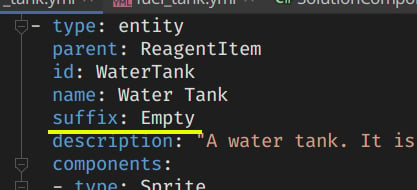
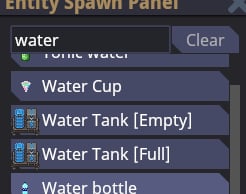
Usesuffix in prototypes, this it’s a spawn-menu-only suffix that allows you to distinguish what prototypes are, without modifying the actual prototype name. You can use it like this:
Localization
Every player-facing string ever needs to be localized.Localization ID naming
- Localization IDs are always
kebab-caseand should never contain capital letters. - Localization IDs should be specific as possible, to avoid clashing with other IDs.
This
Not this
In-simulation or out-of-simulation
Broadly, all code in the game should be separated based on whether it is inside the “simulation” or outside it. The “simulation” is a encompassing term that basically means “the contents of the actual game”. For example, the following things are “inside” the simulation:- Basically everything concerning entities: interactions, physics, atmos, etc.
- IC chat
- Round state (lobby, in-game, post-game)
- OOC chat
- Adminhelp
- Admin votes
- Basically anything talking to an external service, such as the database or a Discord webhook
The game server currently already automatically pauses like this when no players are online, to save resources. This isn’t purely theoretical! But perhaps hard to observe at the moment.