> ## Documentation Index
> Fetch the complete documentation index at: https://docs.ss14.art/llms.txt
> Use this file to discover all available pages before exploring further.
# Admin Tooling
The tools at a Game Admin's disposal take some time to get used to. The tools can range from being easy to understand to requiring a few hours to understand.
## Admin Menu
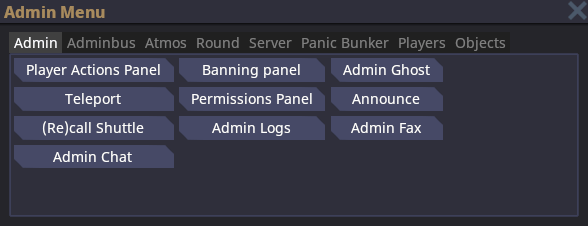 The Admin Menu can be opened by pressing F7 or using the button bar at the top.
The *Admin* tab contains useful actions for general admin use.
The *Adminbus* tab gives you control of many things--including spawning entities, tiles, or decals, as well as running/stopping station events.
The *Atmos* tab lets you modify the atmosphere for the current grid. You shouldn't need to use this when regularly admining.
The *Round* tab lets you control the flow of the current round. You can start, end, or restart the round using this menu. There are equivalent commands for all of these.
The *Server* tab lets you shutdown/restart the entire server, or toggle OOC/LOOC. This is only available to admins with the proper flags.
The *Panic Bunker* tab lets you toggle settings for the Panic Bunker, such as enabling or disabling the Panic Bunker, automatically enabling or disabling the Panic Bunker, count deadmined players, and showing the reason why the Panic Bunker is enabled. You can also set the minimum required account age or overall playtime to bypass the Panic Bunker.
The *Player* tab lets you view all of the players in a round. You can also toggle the **Player Overlay** here, which draws some basic information (username, character name, is antag) over all players in-game.
The *Objects* tab lets you view all of the grids, maps, and stations in the current round, including their name and Entity IDs. You can also teleport to an object or delete it from the tab.
***
## Verbs
### Admin Verbs
The Admin Menu can be opened by pressing F7 or using the button bar at the top.
The *Admin* tab contains useful actions for general admin use.
The *Adminbus* tab gives you control of many things--including spawning entities, tiles, or decals, as well as running/stopping station events.
The *Atmos* tab lets you modify the atmosphere for the current grid. You shouldn't need to use this when regularly admining.
The *Round* tab lets you control the flow of the current round. You can start, end, or restart the round using this menu. There are equivalent commands for all of these.
The *Server* tab lets you shutdown/restart the entire server, or toggle OOC/LOOC. This is only available to admins with the proper flags.
The *Panic Bunker* tab lets you toggle settings for the Panic Bunker, such as enabling or disabling the Panic Bunker, automatically enabling or disabling the Panic Bunker, count deadmined players, and showing the reason why the Panic Bunker is enabled. You can also set the minimum required account age or overall playtime to bypass the Panic Bunker.
The *Player* tab lets you view all of the players in a round. You can also toggle the **Player Overlay** here, which draws some basic information (username, character name, is antag) over all players in-game.
The *Objects* tab lets you view all of the grids, maps, and stations in the current round, including their name and Entity IDs. You can also teleport to an object or delete it from the tab.
***
## Verbs
### Admin Verbs
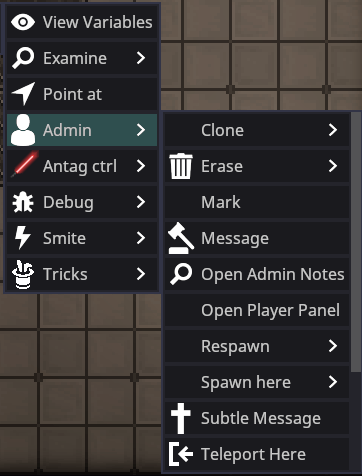 There are multiple admin verbs available. These are all fairly self-explanatory.
* **Clone:** Clones the targeted player's current entity.
* **Erase:** Deletes the targeted player's entity from the round. Useful for removing a character from a round entirely.
* **Mark:** Places an entity into the \$marked variable, a list of entities, replacing its prior value. This can be used in tandem with other toolshed commands to replace the need to type entity IDs.
* **Message:** Opens the ahelp window targeted at the player.
* **Open Admin Notes:** Opens the user's notes. You can also open a player's notes by typing "*adminnotes username*" in the console.
* **Open Player Panel:** Opens a panel with the targeted player's information, such as their username, and if they are whitelisted. The panel also includes their total playtime, notes, bans, role bans, and shared connections. The admin verbs are included in the Player Panel.
* **Teleport Here/To:** "Teleport Here" will teleport the targeted player to your current position. "Teleport To" will teleport you to the targeted player's current position.
* *Freeze* stops them from moving or interacting until they are unfrozen by an admin.
***
### Debug Verbs
There are multiple admin verbs available. These are all fairly self-explanatory.
* **Clone:** Clones the targeted player's current entity.
* **Erase:** Deletes the targeted player's entity from the round. Useful for removing a character from a round entirely.
* **Mark:** Places an entity into the \$marked variable, a list of entities, replacing its prior value. This can be used in tandem with other toolshed commands to replace the need to type entity IDs.
* **Message:** Opens the ahelp window targeted at the player.
* **Open Admin Notes:** Opens the user's notes. You can also open a player's notes by typing "*adminnotes username*" in the console.
* **Open Player Panel:** Opens a panel with the targeted player's information, such as their username, and if they are whitelisted. The panel also includes their total playtime, notes, bans, role bans, and shared connections. The admin verbs are included in the Player Panel.
* **Teleport Here/To:** "Teleport Here" will teleport the targeted player to your current position. "Teleport To" will teleport you to the targeted player's current position.
* *Freeze* stops them from moving or interacting until they are unfrozen by an admin.
***
### Debug Verbs
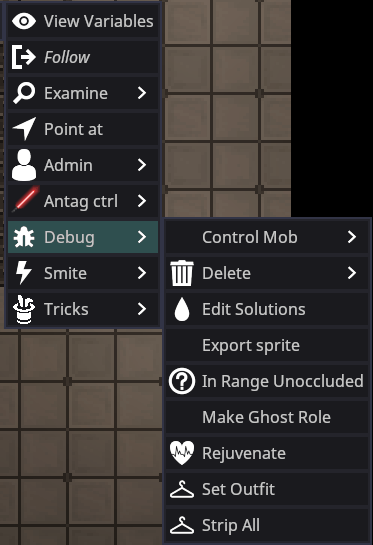 The debug verbs are primarily for debugging, but are also very useful for normal admins.
* **Control Mob:** Gives you control of the entity regardless of whether the entity is sentient or not.
* **Delete:** Deletes the entity. Requires you to confirm the deletion.
* **Edit Solutions:** Opens a panel that lists the current reagents in the entity. This includes reagents in their bloodstream or temporarily in their bloodstream. You can modify the solutions and reagents in the tab.
* **Export Sprite:** Exports the entity's sprite. You can locate your exported sprites in the Space Station 14 folder location > data > Exports
* **In Range Unoccluded:** Checks to see if the targeted entity is occluded or not (if there's a structure between either of you).
* **Make Ghost Role:** Makes an entity a Ghost role that dead players can request.
* **Rejuvenate:** Fully heals an entity, removes any temporary reagents in their body, and resets the entity's temperature. Only use when necessary.
* **Set Outfit:** Opens a panel with preset outfits you can set a player to wear. Some outfits may include extra items. This verb is useful for running events or respawning players.
***
### Smite Verbs
The debug verbs are primarily for debugging, but are also very useful for normal admins.
* **Control Mob:** Gives you control of the entity regardless of whether the entity is sentient or not.
* **Delete:** Deletes the entity. Requires you to confirm the deletion.
* **Edit Solutions:** Opens a panel that lists the current reagents in the entity. This includes reagents in their bloodstream or temporarily in their bloodstream. You can modify the solutions and reagents in the tab.
* **Export Sprite:** Exports the entity's sprite. You can locate your exported sprites in the Space Station 14 folder location > data > Exports
* **In Range Unoccluded:** Checks to see if the targeted entity is occluded or not (if there's a structure between either of you).
* **Make Ghost Role:** Makes an entity a Ghost role that dead players can request.
* **Rejuvenate:** Fully heals an entity, removes any temporary reagents in their body, and resets the entity's temperature. Only use when necessary.
* **Set Outfit:** Opens a panel with preset outfits you can set a player to wear. Some outfits may include extra items. This verb is useful for running events or respawning players.
***
### Smite Verbs
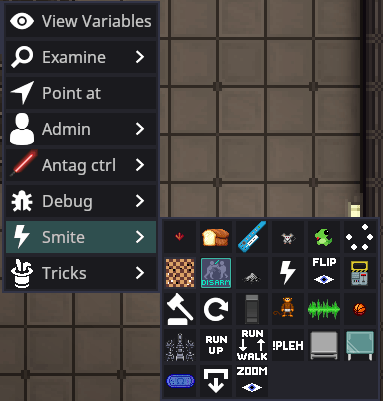 Use sparingly. These smites can range from minor inconveniences to severely affecting a player's round negatively.
***
## Admin Help
Use sparingly. These smites can range from minor inconveniences to severely affecting a player's round negatively.
***
## Admin Help
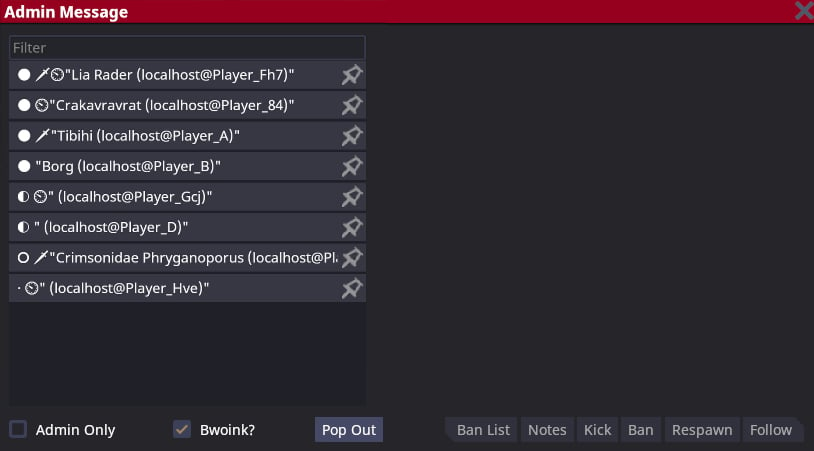 The **Admin Help** menu can be opened by pressing `F1`, by using the `Player Actions Panel` in the **Admin Menu**, or by using the `Message` admin verb.
Upon opening the Admin Help menu, you will see a tab that looks like the image above, but may contain a larger list of players who have logged into the server regardless of whether they are online or not. If the server restarts, the list will be reset.
Different icons may appear to the left of a player's username.
**Sword:** The player is an antagonist.
**White Circle:** The player is online and playing in the current round.
**Half-white Circle:** The player is online and in the round, but currently idle.
**Empty Circle:** The player is offline.
* **Admin Only:** Checking the option will make your messages sent to a player's ahelp only visible to other admins.
* **Bwoink:** Checking or unchecking the option enables or disables the ahelp message sound for the player. This does not apply whenever a normal player ahelps.
* **Ban list:** Opens a tab containing all of the player's bans and information on the ban.
* **Notes:** Opens a tab containing any notes about the player, including their bans.
* **Kick:** Kicks the player from the server.
* **Ban:** Opens the Banning panel with the target's username autofilled.
* **Respawn:** Sends the targeted player to the lobby. Does not delete their character.
* **Follow:** Makes you follow the targeted player.
***
## Admin Logs
The **Admin Help** menu can be opened by pressing `F1`, by using the `Player Actions Panel` in the **Admin Menu**, or by using the `Message` admin verb.
Upon opening the Admin Help menu, you will see a tab that looks like the image above, but may contain a larger list of players who have logged into the server regardless of whether they are online or not. If the server restarts, the list will be reset.
Different icons may appear to the left of a player's username.
**Sword:** The player is an antagonist.
**White Circle:** The player is online and playing in the current round.
**Half-white Circle:** The player is online and in the round, but currently idle.
**Empty Circle:** The player is offline.
* **Admin Only:** Checking the option will make your messages sent to a player's ahelp only visible to other admins.
* **Bwoink:** Checking or unchecking the option enables or disables the ahelp message sound for the player. This does not apply whenever a normal player ahelps.
* **Ban list:** Opens a tab containing all of the player's bans and information on the ban.
* **Notes:** Opens a tab containing any notes about the player, including their bans.
* **Kick:** Kicks the player from the server.
* **Ban:** Opens the Banning panel with the target's username autofilled.
* **Respawn:** Sends the targeted player to the lobby. Does not delete their character.
* **Follow:** Makes you follow the targeted player.
***
## Admin Logs
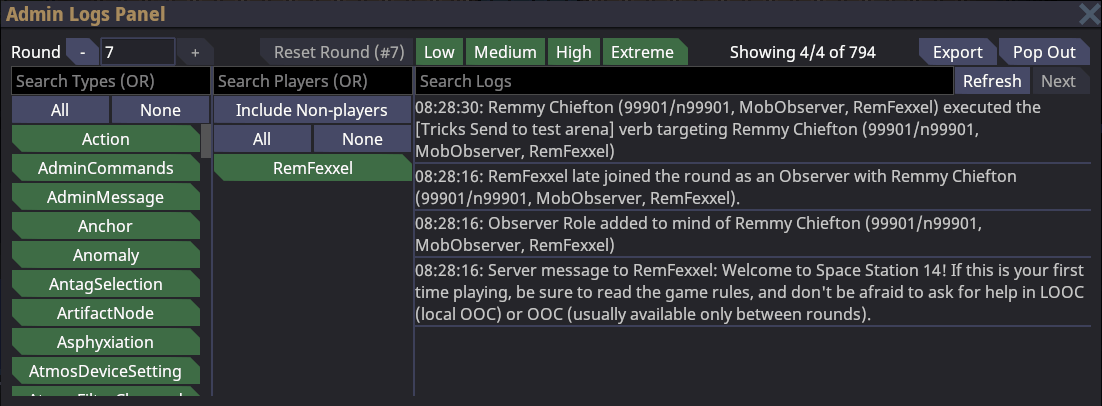 The admin logs menu shows you all interactions that have occurred during the round, as well as which entities and players were involved. It can be opened in the *Admin* tab of the **Admin Menu**, or right-clicking on the entity, clicking 'Admin' then 'Entity Logs', which will instead show you logs that are related to the targeted entity.
The far left menu lets you filter by log type. The second-from-the-left menu lets you filter by the player/entity who was involved in the log.
The top left *Round* spinbox lets you change which round you're looking at, though this rarely needs to be done except for retroactive ahelps.
You can filter by *log impact* at the top, though this is rarely needed if you know what you're looking for.
You can view the actual log data on the far right menu, and search for logs. If the log you're looking for doesn't show up, try hitting *refresh* (you'll likely need to do this when changing which player or log type you're looking for). If it still doesn't show up, press *Next* and wait for a couple of seconds.
The *Pop out* button pops the log menu into a separate OS window. Useful for saving some space on your main monitor, but will sometimes break when running under steam's overlay.
***
## Admin Notes
The admin logs menu shows you all interactions that have occurred during the round, as well as which entities and players were involved. It can be opened in the *Admin* tab of the **Admin Menu**, or right-clicking on the entity, clicking 'Admin' then 'Entity Logs', which will instead show you logs that are related to the targeted entity.
The far left menu lets you filter by log type. The second-from-the-left menu lets you filter by the player/entity who was involved in the log.
The top left *Round* spinbox lets you change which round you're looking at, though this rarely needs to be done except for retroactive ahelps.
You can filter by *log impact* at the top, though this is rarely needed if you know what you're looking for.
You can view the actual log data on the far right menu, and search for logs. If the log you're looking for doesn't show up, try hitting *refresh* (you'll likely need to do this when changing which player or log type you're looking for). If it still doesn't show up, press *Next* and wait for a couple of seconds.
The *Pop out* button pops the log menu into a separate OS window. Useful for saving some space on your main monitor, but will sometimes break when running under steam's overlay.
***
## Admin Notes
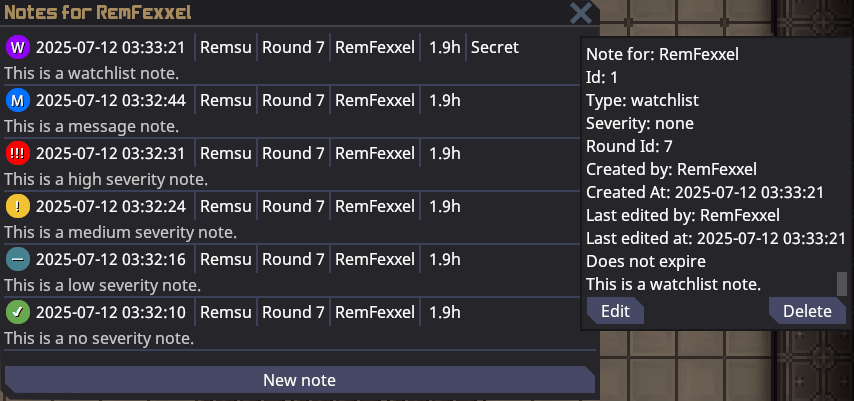 Admin notes give admins a way to store information about a user when a ban would be too harsh a punishment, or for archival of observed behavior in some instances. Notes can be hidden from the player if necessary. Notes can be edited (and show their edit information), and can be deleted if the note is no longer relevant.
Admin notes are visible by default for six months, then gradually become less visible until they are no longer visible at the end of those six months. You can hover your mouse over the note to make it easier to see. The note will *never* delete itself unless it is not a permanent note.
If you want the note to expire and automatically delete itself, you can uncheck 'permanent?' and choose when the note should be deleted.
Notes can be accessed using the `Admin` verb category, at the bottom of the AHelp menu, or by typing "*adminnotes username*" in the console.
***
## View Variables
**View variables** is a very, very useful tool that allows you to view all marked variables on every component that an entity has, as well as modify some. Useful for debugging, but also has great use for adminning as it allows you to add or remove arbitrary components, for example `OwOAccent`. Further explanation of how to use **View variables** (VV) is given below.
Admin notes give admins a way to store information about a user when a ban would be too harsh a punishment, or for archival of observed behavior in some instances. Notes can be hidden from the player if necessary. Notes can be edited (and show their edit information), and can be deleted if the note is no longer relevant.
Admin notes are visible by default for six months, then gradually become less visible until they are no longer visible at the end of those six months. You can hover your mouse over the note to make it easier to see. The note will *never* delete itself unless it is not a permanent note.
If you want the note to expire and automatically delete itself, you can uncheck 'permanent?' and choose when the note should be deleted.
Notes can be accessed using the `Admin` verb category, at the bottom of the AHelp menu, or by typing "*adminnotes username*" in the console.
***
## View Variables
**View variables** is a very, very useful tool that allows you to view all marked variables on every component that an entity has, as well as modify some. Useful for debugging, but also has great use for adminning as it allows you to add or remove arbitrary components, for example `OwOAccent`. Further explanation of how to use **View variables** (VV) is given below.
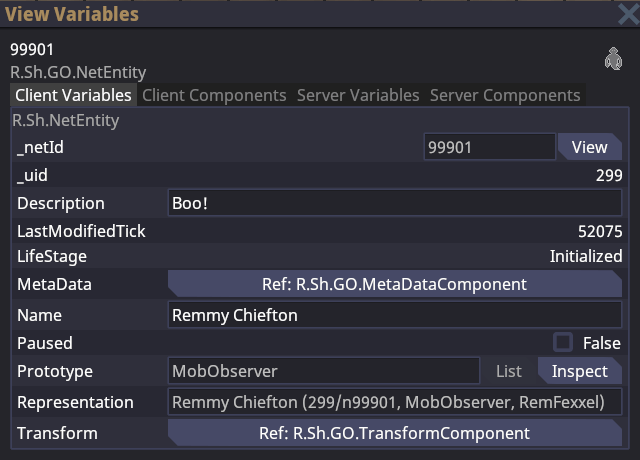 A couple of things to discuss about how SS14 works before the VV menu can be useful to you:
**Be careful when editing or deleting variables. Sometimes, when you delete certain variables or edit specific parts of a variable, the entity may break altogether or crash the server.**
*For example, editing the AttackRate setting in the 'MeleeWeapon' component to be an extremely fast rate can crash server.*
*If you are unsure whether editing or removing a variable may cause issues, experiment in a [localhost server](https://docs.spacestation14.com/en/general-development/setup/server-hosting-tutorial.html)!*
The *'Transform'* and *'MetaData'* components cannot be removed via toolshed or view variables.
* An 'entity' is an object in game: walls, players, projectiles, items, etc. Each entity has a unique EntityUid corresponding to it, which is the number you see at the top left next to the entity's name or when you right click them. In the example above, the entity's ID is 99901.
* Each entity (generally) has a prototype ID, or the 'type' of entity it is. This is the `MobObserver` string you see at the top left. This is also found if you right click an entity.
* Entities have **components**, which give some kind of behavior to the entity. The component for a 'player-controlled' entity is `ActorComponent`, for a weapon it is `MeleeWeaponComponent`, for damageable objects it is `DamageableComponent`, etc. You can dynamically add and remove components whenever you want.
* The game is separated into 'client' and 'server', with some shared stuff between them. Client is what's running on your computer, server is what's running on the game server.
Typically, you'll want to view the **Server Components** list, as you can add/remove/modify components there, and every client will see the effects.
I recommend that you simply try and use the VV menu to get a feel for how it works. It's a little daunting, but once you get the hang of using VV, you'll be able to fix problems afflicting an entity and try new ideas with less trouble.
### VV Tips
* Press `enter` after modifying a variable to save its value.
* Some variables may look non-modifiable, but there may be a modifiable version of them further down the list.
* `TransformComponent` holds the entity's position, rotation, etc.
* `Grids` (the station) are entities too, and their components can be changed
* You can modify the `zoom` on the client-side `EyeComponent` to see further.
* `MindComponent` contains information like antag roles, jobs, objectives, etc.
* An entity's name/description can be changed using `Server Variables`, or on the server-side `MetaDataComponent`.
***
## Game Console
A couple of things to discuss about how SS14 works before the VV menu can be useful to you:
**Be careful when editing or deleting variables. Sometimes, when you delete certain variables or edit specific parts of a variable, the entity may break altogether or crash the server.**
*For example, editing the AttackRate setting in the 'MeleeWeapon' component to be an extremely fast rate can crash server.*
*If you are unsure whether editing or removing a variable may cause issues, experiment in a [localhost server](https://docs.spacestation14.com/en/general-development/setup/server-hosting-tutorial.html)!*
The *'Transform'* and *'MetaData'* components cannot be removed via toolshed or view variables.
* An 'entity' is an object in game: walls, players, projectiles, items, etc. Each entity has a unique EntityUid corresponding to it, which is the number you see at the top left next to the entity's name or when you right click them. In the example above, the entity's ID is 99901.
* Each entity (generally) has a prototype ID, or the 'type' of entity it is. This is the `MobObserver` string you see at the top left. This is also found if you right click an entity.
* Entities have **components**, which give some kind of behavior to the entity. The component for a 'player-controlled' entity is `ActorComponent`, for a weapon it is `MeleeWeaponComponent`, for damageable objects it is `DamageableComponent`, etc. You can dynamically add and remove components whenever you want.
* The game is separated into 'client' and 'server', with some shared stuff between them. Client is what's running on your computer, server is what's running on the game server.
Typically, you'll want to view the **Server Components** list, as you can add/remove/modify components there, and every client will see the effects.
I recommend that you simply try and use the VV menu to get a feel for how it works. It's a little daunting, but once you get the hang of using VV, you'll be able to fix problems afflicting an entity and try new ideas with less trouble.
### VV Tips
* Press `enter` after modifying a variable to save its value.
* Some variables may look non-modifiable, but there may be a modifiable version of them further down the list.
* `TransformComponent` holds the entity's position, rotation, etc.
* `Grids` (the station) are entities too, and their components can be changed
* You can modify the `zoom` on the client-side `EyeComponent` to see further.
* `MindComponent` contains information like antag roles, jobs, objectives, etc.
* An entity's name/description can be changed using `Server Variables`, or on the server-side `MetaDataComponent`.
***
## Game Console
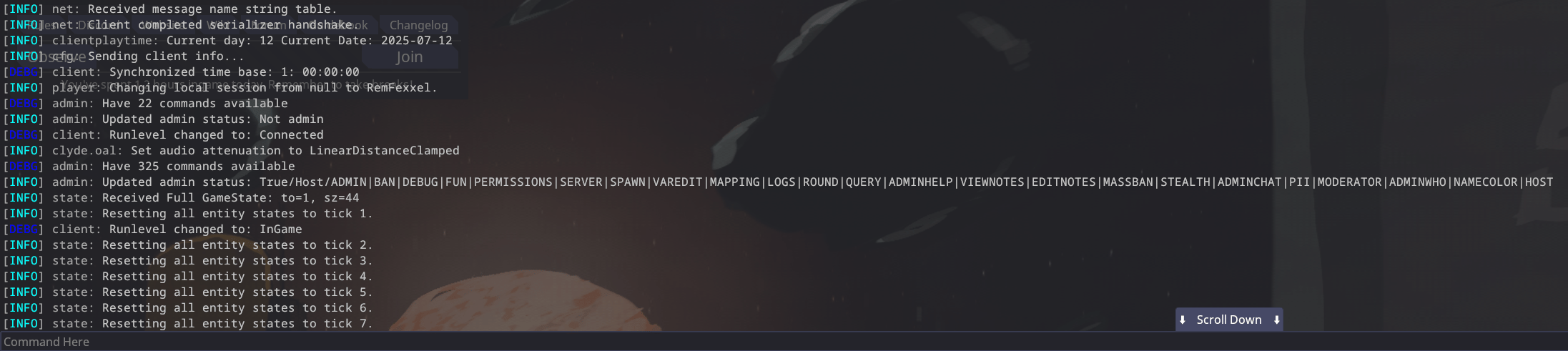 ***
The console can be opened using the tilde `~` key, unless rebound. Any player can open it, but I'm just mentioning it here in case you were unaware of that fact. Commands can be run by typing the command and then the arguments, like any shell. Important client logs will show up here as well, so it's useful for debugging.
Use the `list` command to list all available commands, and the `help ` command to view instructions for the command.
### Useful Commands
| Command | Description | Syntax |
| --------------------- | ----------------------------------------------------------------------------------------------------------------------------------------------------------------------------------------------- | --------------------------------------------------------------------------------------------------- |
| `aghost` | Turn yourself into an admin ghost, or back again. | |
| `deadmin` | Lets you play the game without getting admin notifications. Always use before playing in a round normally. Persists across rounds and servers until you use the '*readmin*' command. | |
| `readmin` | Returns all admin functions to the user after they `deadmin`. Not necessary to run upon joining. | |
| `help` | Shows information about the specified command. | `help ` |
| `list` | Lists all commands in the game. | |
| `list ` | Lists all commands with the specified keyword. | `list ` |
| `quit` | Closes the game. | |
| `adminwho` | List all admins online. | |
| `togglehealthoverlay` | Toggles a visual layer for the playerhealth. | `togglehealthoverlay ` |
| `scale` | Make things bigger or smaller. Relative to current size (2 twice is the same as 4 once). | `scale ` |
| `adduplink` | Adds an uplink to a PDA and links it to the user. | `adduplink ` |
| `lsobjective` | Shows all objectives of the targeted player. | `lsobjective ` |
| `addobjective` | Adds an objective, requires the objective ID. | `addobjective ` |
| `fixgridatmos` | Resets all atmos on the grid to breathable and clean. | `fixgridatmos ` (use autofill) |
| `tpto` | Teleport all targets to the first `` in the command. | `tpto ` |
| `tp` | Teleports yourself to the coordinates on the specified map. | `tp ` |
| `setmind` | Puts the player's soul into the ID (may require the entity to have a mind). | `setmind ` |
| `customvote` | Creates a custom vote for all players, requires at least two choices. Always do this before running any important events. Quotes are not necessary unless you have spaces in the option itself. | `customvote "What should I eat today?" Ravioli Fetuccine! "A bunch of ice cream!" "Spaghetti!" ...` |
| `addhand` | Adds a hand to the entity; not all entities are supported, requires the "Hands" component in the entity. | `addhand ` |
| `addgamerule` | Adds the chosen game event to the game. | `addgamerule ` |
| `endgamerule` | Removes the chosen gamerule from the game. Useful for repeating false events. | `endgamerule ` |
| `rename` | Correct way to rename a person (includes ID, PDA, and cloner entries). | `rename <"FIRSTNAME LASTNAME">` |
| `setadminooc` | Changes the color of your adminchat while being an admin. | `setadminooc ` |
| `addcomp` | Adds a component to an entity. | `addcomp ` |
| `banlist` | List all bans for a user. | `banlist ` |
| `dock` | Tries to dock two docking airlocks together. | `dock ` |
| `forcemap` | Forces the next map to the given map. | `forcemap
***
The console can be opened using the tilde `~` key, unless rebound. Any player can open it, but I'm just mentioning it here in case you were unaware of that fact. Commands can be run by typing the command and then the arguments, like any shell. Important client logs will show up here as well, so it's useful for debugging.
Use the `list` command to list all available commands, and the `help ` command to view instructions for the command.
### Useful Commands
| Command | Description | Syntax |
| --------------------- | ----------------------------------------------------------------------------------------------------------------------------------------------------------------------------------------------- | --------------------------------------------------------------------------------------------------- |
| `aghost` | Turn yourself into an admin ghost, or back again. | |
| `deadmin` | Lets you play the game without getting admin notifications. Always use before playing in a round normally. Persists across rounds and servers until you use the '*readmin*' command. | |
| `readmin` | Returns all admin functions to the user after they `deadmin`. Not necessary to run upon joining. | |
| `help` | Shows information about the specified command. | `help ` |
| `list` | Lists all commands in the game. | |
| `list ` | Lists all commands with the specified keyword. | `list ` |
| `quit` | Closes the game. | |
| `adminwho` | List all admins online. | |
| `togglehealthoverlay` | Toggles a visual layer for the playerhealth. | `togglehealthoverlay ` |
| `scale` | Make things bigger or smaller. Relative to current size (2 twice is the same as 4 once). | `scale ` |
| `adduplink` | Adds an uplink to a PDA and links it to the user. | `adduplink ` |
| `lsobjective` | Shows all objectives of the targeted player. | `lsobjective ` |
| `addobjective` | Adds an objective, requires the objective ID. | `addobjective ` |
| `fixgridatmos` | Resets all atmos on the grid to breathable and clean. | `fixgridatmos ` (use autofill) |
| `tpto` | Teleport all targets to the first `` in the command. | `tpto ` |
| `tp` | Teleports yourself to the coordinates on the specified map. | `tp ` |
| `setmind` | Puts the player's soul into the ID (may require the entity to have a mind). | `setmind ` |
| `customvote` | Creates a custom vote for all players, requires at least two choices. Always do this before running any important events. Quotes are not necessary unless you have spaces in the option itself. | `customvote "What should I eat today?" Ravioli Fetuccine! "A bunch of ice cream!" "Spaghetti!" ...` |
| `addhand` | Adds a hand to the entity; not all entities are supported, requires the "Hands" component in the entity. | `addhand ` |
| `addgamerule` | Adds the chosen game event to the game. | `addgamerule ` |
| `endgamerule` | Removes the chosen gamerule from the game. Useful for repeating false events. | `endgamerule ` |
| `rename` | Correct way to rename a person (includes ID, PDA, and cloner entries). | `rename <"FIRSTNAME LASTNAME">` |
| `setadminooc` | Changes the color of your adminchat while being an admin. | `setadminooc ` |
| `addcomp` | Adds a component to an entity. | `addcomp ` |
| `banlist` | List all bans for a user. | `banlist ` |
| `dock` | Tries to dock two docking airlocks together. | `dock ` |
| `forcemap` | Forces the next map to the given map. | `forcemap